Automate Push notification with Node acs
Posted By : Pawanpreet Singh | 31-Mar-2015
For basic infomation on node acs please refer to my other post.
Here we will learn how to automate the process of sending push notification from server to your devices, For this we will use node.acs and appcelerator push notification services. As you know the structure of the Node.acs project as discussed in my previous post. Here we will implement the functionality.
Working
What we are going to do is check a webservice which we are assuming will return timestamp when of last change, we are saving this timestamp in persistent storage andserver will continuously hit the webservice to check whether there is any difference between the last change timestamp, If there iis a difference in the timestamp then it will call the function which sends a push notification request to the appcelerator cloud push notification service with the detail of the channel whom to which we want to send push notification. Then cloud server will send a push notification to the device. Your device must be registered for the channel to whom the push notification we are sending for testing purpose.
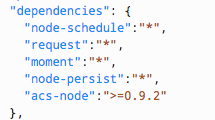
Add the following dependencies in package.json file as shown in figure below:
- node-schedule - we are using this to use cron service for our app so that we can automate our process.
- request - we are using this to make a request to a webservice.
- moment - we are using this to handle various types of date/time object.
- node-persist - we are using this to save our data locally in persistent manner.
Open application.js under controllers directory and replace the contents with the following
 function index(req, res) {
	res.render('index', {
		title : 'Our Test Automation App to send Push Notification'
	});
}

var schedule = require('node-schedule');
var request = require('request');
var moment = require('moment');
var storage = require('node-persist');
var ACS = require('acs-node');
var sdk = ACS.init('xxxxxxxxxxxxxxxxxxx');//add this with production/development app key of acs push notification cloud services
var then = "2013-12-11T16:12:21.636Z";

storage.initSync();
storage.setItem('then', then);

schedule.scheduleJob('*/10 * * * *', function() {
	request('http://mywebsiteurl/newsFeedLastUpdate.json', function(error, response, body) {
		if (!error && response.statusCode == 200) {
			var json = JSON.parse(body);
			var now = json.lastUpdated;
			var diff = moment(now).diff(storage.getItem('then'), "m");

			if (diff > 0) {
				console.log("difference in timestamp: " + diff);
				storage.setItem('then', now);

				var data = {
					login : "credential of the user you created for this app in acs panel", // App Admin User credentials
					password : "Its password"
				};

				sdk.rest('users/login.json', 'POST', data, function(data) {
					if (data && data.meta) {
						if (data.meta.status == 'ok') {
							console.log("Successful to login.");
							sendPushNotification(data.meta.session_id);
						} else {
							console.log("Error to login: " + data.meta.message);
						}
					} else {
						console.log("Error to login, try again later.");
					}
				});
			} else {
				console.log("No difference found in timestamp, nothing sent with push notification.");
			}
		}
	});
});


function sendPushNotification(session_id) {
	var data = {
		"_session_id":session_id,
		"to_ids":"everyone",
		"channel" : "mychannel",
		"payload" : {
			"alert" : "There are new articles in the Countdown Library"
		}
	};

	sdk.rest("push_notification/notify.json", 'POST', data, function(data) {
		if (data && data.meta) {
			if (data.meta.status == 'ok') {
				console.log(JSON.stringify(data.response.push_notification));
			}else{
				console.log("Error in sending push notification: " + data.meta.message);
			}
		} else {
			console.log("Error to login, try again later.");
		}
	});
}
You must add the cloud api key in the SDK in the above code and must create a user for app which will send request to your acs push notification service, you have to enter his detail in the login/password written in the above code
You have to create a webservice which will return the last update timestamp
For more information on client side setup of appcelerator push notification please refer to this link and for server side setup please refer to this link.


Cookies are important to the proper functioning of a site. To improve your experience, we use cookies to remember log-in details and provide secure log-in, collect statistics to optimize site functionality, and deliver content tailored to your interests. Click Agree and Proceed to accept cookies and go directly to the site or click on View Cookie Settings to see detailed descriptions of the types of cookies and choose whether to accept certain cookies while on the site.















About Author
Pawanpreet Singh
Pawanpreet is an seasoned Project Manager with a wealth of knowledge in software development, specializing in frontend and mobile applications. He possesses a strong command of project management tools, including Jira, Trello, and others. With a proven track record, he has successfully overseen the delivery of multiple software development projects, managing budgets and large teams. Notable projects he has contributed to include TimeForge, Yogyata, Kairos, Veto, Inspirien App, and more. Pawanpreet excels in developing and maintaining project plans, schedules, and budgets, ensuring timely delivery while staying within allocated resources. He collaborates closely with clients to define project scope and requirements, establish timelines and milestones, and effectively manage expectations. Regular project status meetings are conducted by him, providing clients and stakeholders with consistent updates on project progress, risks, and issues. Additionally, he coaches and mentors project leads, offering guidance on project management best practices and supporting their professional development.