Using Appcelerator Cloud Serives Push Notification Part I
Posted By : Pawanpreet Singh | 31-Mar-2015
I will show you how to you can implement push notification services provided by appcelerator cloup services. Here we will try to send notification to an iOS device which is subscribed to a channel. Before starting you must check that you have TitaniumStudio with latest SDK installed.
Lets get started:-
Handling Client Side
- Open TitaniumStudio -> New -> Mobile App Project
New Dialog will appear, Here don't change Alloy from the side menu then select “Default Alloy Project” and click next
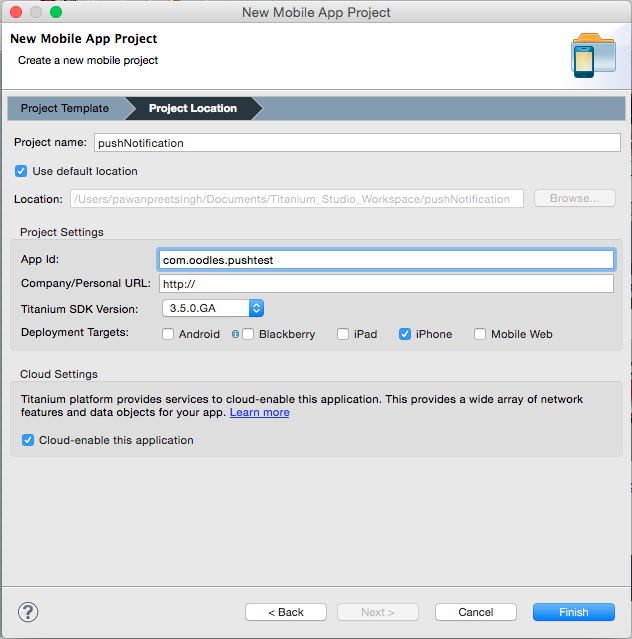
Enter Project name, App Id and just select iPhone in deployment targets and you must select the “cloud-enable this application” checkbox. As shown in the figure below:
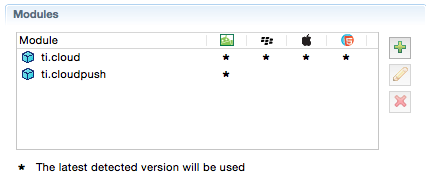
- add ti.cloud and ti.cloudpush to your project in modules as shown in the following figure
- add the following code in acsPush.js under lib folder.
var Cloud = require("ti.cloud"); var osname = Ti.Platform.osname; var channel = ""; var receivePush = function(e) { Ti.API.info('got pushCallback'); Ti.API.debug(JSON.stringify(e)); if (osname != "android") { // Do Something here? alert("Notification received: " + JSON.stringify(e)); } else { //var extras = e.extras; setTimeout(function() { // Do Something here? alert("Notification received: " + JSON.stringify(e)); }, 750); } }; function deviceTokenError(e) { Ti.API.error('Failed to register for push notifications! ' + e.error); } function deviceTokenSuccess(e) { Ti.API.debug('got retrieveDeviceToken success'); Ti.API.debug('e=' + JSON.stringify(e)); Ti.API.debug('channel=' + channel); subscribeToChannel(e.deviceToken); } function subscribeToChannel(token) { Cloud.PushNotifications.subscribeToken({ device_token : token, channel : channel, type : Ti.Platform.name == 'android' ? 'android' : 'ios' }, function(e) { if (e.success) { Ti.API.info('subscribed'); Ti.App.fireEvent('push:register', { token : token }); } else { Ti.API.error('Error:\n' + ((e.error && e.message) || JSON.stringify(e))); } }); } if (osname != "android") { exports.registerForPush = function(username) { channel = username; Ti.API.info('registering for PUSH'); Ti.API.info('platform=' + Ti.Platform.version.split(".")[0]); // Check if the device is running iOS 8 or later if (parseInt(Ti.Platform.version.split(".")[0]) >= 8) { function registerForPush() { Ti.Network.registerForPushNotifications({ success : deviceTokenSuccess, error : deviceTokenError, callback : receivePush }); // Remove event listener once registered for push notifications Ti.App.iOS.removeEventListener('usernotificationsettings', registerForPush); }; // Wait for user settings to be registered before registering for push notifications Ti.App.iOS.addEventListener('usernotificationsettings', registerForPush); // Register notification types to use Ti.App.iOS.registerUserNotificationSettings({ types : [Ti.App.iOS.USER_NOTIFICATION_TYPE_ALERT, Ti.App.iOS.USER_NOTIFICATION_TYPE_SOUND, Ti.App.iOS.USER_NOTIFICATION_TYPE_BADGE] }); } else { // For iOS 7 and earlier Ti.Network.registerForPushNotifications({ // Specifies which notifications to receive types : [Ti.Network.NOTIFICATION_TYPE_BADGE, Ti.Network.NOTIFICATION_TYPE_ALERT, Ti.Network.NOTIFICATION_TYPE_SOUND], success : deviceTokenSuccess, error : deviceTokenError, callback : receivePush }); } }; } else { var CloudPush = require('ti.cloudpush'); exports.registerForPush = function(username) { channel = username; Ti.API.info('registering for PUSH'); CloudPush.retrieveDeviceToken({ success : deviceTokenSuccess, error : deviceTokenError }); CloudPush.showTrayNotificationsWhenFocused = true; CloudPush.addEventListener('callback', receivePush); }; } - In index.js file under controller folder add the following code.
var acs = require('/js/acsPush');
	acs.registerForPush("library");
Before continuing you must have the following files ready
- you must created a iOS development certificate.
- Apple Id with push notification enabled. (must be same as your appId)
- Apple Push Notification certificate.
Please refer to second part of this tutorial to know how to handle server side thingz...


Cookies are important to the proper functioning of a site. To improve your experience, we use cookies to remember log-in details and provide secure log-in, collect statistics to optimize site functionality, and deliver content tailored to your interests. Click Agree and Proceed to accept cookies and go directly to the site or click on View Cookie Settings to see detailed descriptions of the types of cookies and choose whether to accept certain cookies while on the site.
















About Author
Pawanpreet Singh
Pawanpreet is an seasoned Project Manager with a wealth of knowledge in software development, specializing in frontend and mobile applications. He possesses a strong command of project management tools, including Jira, Trello, and others. With a proven track record, he has successfully overseen the delivery of multiple software development projects, managing budgets and large teams. Notable projects he has contributed to include TimeForge, Yogyata, Kairos, Veto, Inspirien App, and more. Pawanpreet excels in developing and maintaining project plans, schedules, and budgets, ensuring timely delivery while staying within allocated resources. He collaborates closely with clients to define project scope and requirements, establish timelines and milestones, and effectively manage expectations. Regular project status meetings are conducted by him, providing clients and stakeholders with consistent updates on project progress, risks, and issues. Additionally, he coaches and mentors project leads, offering guidance on project management best practices and supporting their professional development.