An Introduction To Usability Testing
Posted By : Monika Garg | 25-Jan-2018
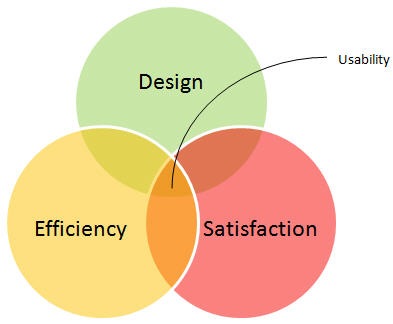
What is Usability?
- Software application should be usable; this is the basic idea of usability.
- Usability helps the user who is having zero knowledge about how to access the website or any software application in all manners.
- Usability helps the user to obtain the features such as ease of use, speed
and efficiency, good to seedesign , fast and easy recovery from errors etc.
What is Usability Guidelines?
Following guidelines:
- Verify homepage with all important options, navigations, links, images, scrolling
and paging etc. - Check for controls such as list boxes, radio buttons, drop down etc.
- Search option should be available on each page
- Inform about available search result filtrations, automatic search hints
- Check for application contents, instructions, acronyms
and abbreviations - Avoid unsolicited graphics
- Establish user requirements and understand user’s expectations
- Information should be usable, readable and printable if required
- Avoid unnecessary amount of information
- Making use of colors for grouping similar items
- Simple background with clickable areas wherever necessary
- Use videos or animation for better understanding the object
What is Usability Testing?
- To verify the ease of usage of the user interface within an application is what usability testing is about. Learnability and memorability, efficiency, error, satisfaction of the application are main factors in this case.
- Usability testing helps to reveal whether the users feel convenient with your software application according to different parameters – the flow, navigation
and layout, look and feel, speed and content – especially in comparison to prior or similar applications. - It tests the following features of the software.
- — How easy it is to use the software application.
- — How easy it is to learn the software application.
- — How comfortable is the software to end
user.
Usability Testing Tools List:
#1) Silverback
#2) CrazyEgg
#3) ClickHeat
#4) BrowserShots
#5) BrowserShots
Key Benefits of Usability Testing:
- Analysis the strengths and weaknesses of your software application.
- Increase the user’s productivity
- Decrease development and redesign cost which increases user satisfaction.
- Help to determine the real requirements
- Increase business due to satisfied customers.
- Reduces user acclimation time and errors.
- Provide better quality software to the end user or the customer.
Softwar e will be easy to understand and use byend user or the customer.


Request for Proposal
Cookies are important to the proper functioning of a site. To improve your experience, we use cookies to remember log-in details and provide secure log-in, collect statistics to optimize site functionality, and deliver content tailored to your interests. Click Agree and Proceed to accept cookies and go directly to the site or click on View Cookie Settings to see detailed descriptions of the types of cookies and choose whether to accept certain cookies while on the site.
















About Author
Monika Garg
Monika is a bright QA Engineer with skills in manual testing and always eager to learn new things. Her hobbies are listening to music and playing games.