Custom fonts in Titanium
Posted By : Siddharth Dixit | 25-Feb-2015
This blog describes the addition of custom fonts in Titanium. Sometimes there are requirements to add custom fonts such as handwritten, fancy fonts etc. into the application. Fonts give unique texture to the text used.
1) First of all, create the project in Titanium.
2) Go to app>assets folder and create the fonts folder for alloy project, add the fonts folder into the resources folder in case of classic project.
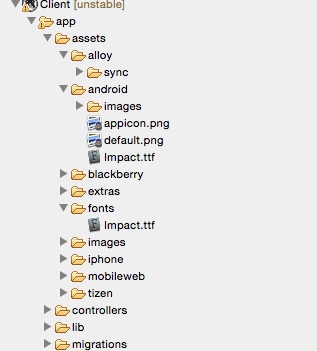
4) Place the respective fonts files into it, the font files must be in .otf and .ttf format.
5) Open the tiapp.xml file and write the following code into ios plist.
<ios>
<plist>
<dict>
<key>UIAppFonts</key>
<array>
<string>fonts/Impact.ttf</string>
</array>
</dict>
</plist>
</ios>
Lastly, write the following code in app.js -
var label = Ti.UI.createLabel({
	text: "Hello world",
	textAlign :'center',
	font: {
		fontSize: 24,
		fontFamily:'Impact'

	},
	color: "#686868",
	height: Ti.UI.SIZE
});
win.add(label);
win.open();
Thanks


Cookies are important to the proper functioning of a site. To improve your experience, we use cookies to remember log-in details and provide secure log-in, collect statistics to optimize site functionality, and deliver content tailored to your interests. Click Agree and Proceed to accept cookies and go directly to the site or click on View Cookie Settings to see detailed descriptions of the types of cookies and choose whether to accept certain cookies while on the site.
















About Author
Siddharth Dixit
Siddharth is an iPhone and Android application developer with experience in Titanium Framework .