Use Thymeleaf And JSP Simultaneously In Spring Boot App
Posted By : S. Ajit | 21-Oct-2017
Consider a spring boot application that already using thymeleaf and there is a need in your application to have JSP page for processing few data in JSP page. To use JSP along with Thymeleaf we need to configure InternalResourceViewResolver bean along with addition few dependencies.
Lets implement this step by step.
STEP 1: Add Thymeleaf and JSP dependencies
Add below dependencies to your pom.xml file
<dependency>
    <groupId>org.springframework.boot</groupId>
    <artifactId>spring-boot-starter-thymeleaf</artifactId>
</dependency>
<dependency>
    <groupId>org.apache.tomcat.embed</groupId>
    <artifactId>tomcat-embed-jasper</artifactId>
    <scope>provided</scope>
</dependency>
<dependency>
    <groupId>javax.servlet</groupId>
    <artifactId>jstl</artifactId>
</dependency>
<dependency>
    <groupId>org.springframework.boot</groupId>
    <artifactId>spring-boot-starter-tomcat</artifactId>
    <scope>provided</scope>
</dependency>
STEP 2: Project structure and file creation
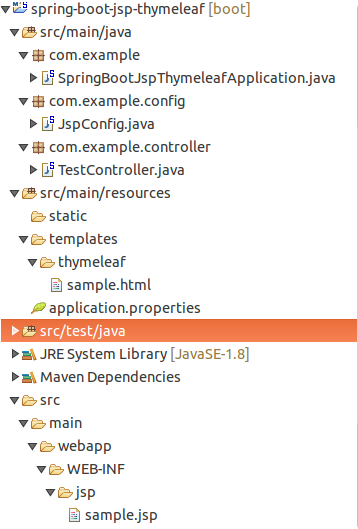
Project folder structure is shown above . Create a sample.html with below written content
<!DOCTYPE html>
<html lang="en" xmlns:th="http://www.thymeleaf.org">
<head>
    <title>Hello</title>
</head>
<body>
    THYMELEAF PAGE: <p th:text="${name}"></p>
</body>
</html>
For sample.jsp use this below content
<!DOCTYPE html>
<html lang="en">
<head>
    <title>Hello</title>
</head>
<body>
    JSP PAGE: Hello ${name}
</body>
</html>
In your application.properties set thymeleaf view names and JSP configuration for internal view resolution
spring.view.prefix:/WEB-INF/
spring.view.suffix:.jsp
spring.view.view-names:jsp/*
spring.thymeleaf.view-names:thymeleaf/*
Lets create a configuration class for view resolution for JSP pages
package com.example.config;

import org.springframework.beans.factory.annotation.Value;
import org.springframework.context.annotation.Bean;
import org.springframework.context.annotation.Configuration;
import org.springframework.web.servlet.view.InternalResourceViewResolver;
import org.springframework.web.servlet.view.JstlView;

@Configuration
public class JspConfig {
    @Value("${spring.view.prefix}")
    private String prefix;

    @Value("${spring.view.suffix}")
    private String suffix;

    @Value("${spring.view.view-names}")
    private String viewNames;

    @Bean
    InternalResourceViewResolver jspViewResolver() {
        final InternalResourceViewResolver viewResolver = new InternalResourceViewResolver();
        viewResolver.setPrefix(prefix);
        viewResolver.setSuffix(suffix);
        viewResolver.setViewClass(JstlView.class);
        viewResolver.setViewNames(viewNames);
        return viewResolver;
    }
}
Finally create controller for serving Thymeleaf and JSP pages:
package com.example.controller;

import org.springframework.stereotype.Controller;
import org.springframework.ui.Model;
import org.springframework.web.bind.annotation.GetMapping;
import org.springframework.web.bind.annotation.RequestParam;

@Controller
public class TestController {
    @GetMapping("/jsp")
    String jspPage(Model model,@RequestParam String name) {
        model.addAttribute("name", name);
        return "jsp/sample";
    }

    @GetMapping("/thymeleaf")
    String thymeleafPage(Model model,@RequestParam String name) {
        model.addAttribute("name", name);
        return "thymeleaf/sample";
    }
}
Please note in /jsp request mapping we have used jsp/sample in return statement here jsp represent view-name which we have specified in InternalResourceViewResolver bean and the sample denote sample.jsp page . For /thymeleaf also thymeleaf is the view name which is specified in application.properties file and the sample denote sample.html.
STEP 3: Testing application
When you hit this url in your browser: http://localhost:8080/thymeleaf?name=ajit . This will open our sample.html file with parameter name in center of page and with this url: http://localhost:8080/jsp?name=ajit will open sample.jsp page with parameter name in center
Thanks


Cookies are important to the proper functioning of a site. To improve your experience, we use cookies to remember log-in details and provide secure log-in, collect statistics to optimize site functionality, and deliver content tailored to your interests. Click Agree and Proceed to accept cookies and go directly to the site or click on View Cookie Settings to see detailed descriptions of the types of cookies and choose whether to accept certain cookies while on the site.















About Author
S. Ajit
Ajit is a software developer who loves solving problems and programming in C, C++, Java. He also has a passion to learn new technologies.