Setting VSFTPD server behind NAT on EC2 instance
Posted By : Ankit Arora | 30-Mar-2017
What is VSFTPD?
A FTP server for *nix systems which also supports IPv6 & SSL. Here VS in VSFTPD stands for “Very Secure”.
VSFTPD works in two modes : ACTIVE & PASSIVE.
Diagram below explains in a better way:
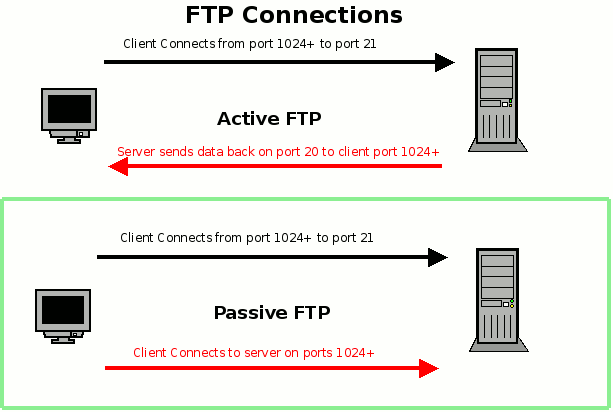
We use Passive mode to connect to server which is behind a firewall or NAT.
Yesterday I installed & configured VSFTPD server in CentOS6.8 on an EC2 instance which is placed behind a NAT. But something was wrong, as I was able to login into FTP server using username & password with command
ftp -p <IP address>
-p for passive mode
but I was not able to list the directories inside server.
Whenever I used to run “ls” command it used to get stuck at ftp> ls
227 Entering Passive Mode (192,241,213,27,36,39).
ftp: connect: Connection timed out
Which means FTP command port is working fine but Data Port is creating problem.
So here is the corrent configuration file.
anonymous_enable=NO
local_enable=YES
write_enable=YES
local_umask=022
dirmessage_enable=YES
xferlog_enable=YES
connect_from_port_20=YES
chown_uploads=YES
chown_username=admin
xferlog_std_format=YES
chroot_local_user=YES
listen=YES
pam_service_name=vsftpd
userlist_enable=YES
tcp_wrappers=YES
## Adding passive ports
pasv_enable=YES
pasv_min_port=50000
pasv_max_port=50100
pasv_address=54.85.224.151
listen_port=21
pasv_addr_resolve=YES
THANKS


Cookies are important to the proper functioning of a site. To improve your experience, we use cookies to remember log-in details and provide secure log-in, collect statistics to optimize site functionality, and deliver content tailored to your interests. Click Agree and Proceed to accept cookies and go directly to the site or click on View Cookie Settings to see detailed descriptions of the types of cookies and choose whether to accept certain cookies while on the site.















About Author
Ankit Arora
Ankit is a Redhat Certified Engineer and Cloud Engineer.