Know about video delivery modes
Posted By : Oodles Admin | 10-Aug-2015
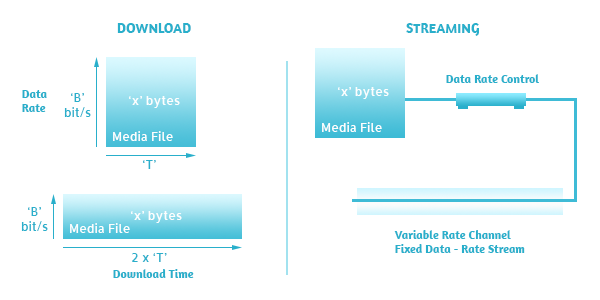
Streaming and downloading are the two ways by which viewer can view the media (Audio/video) over the internet across globe.
Downloading:
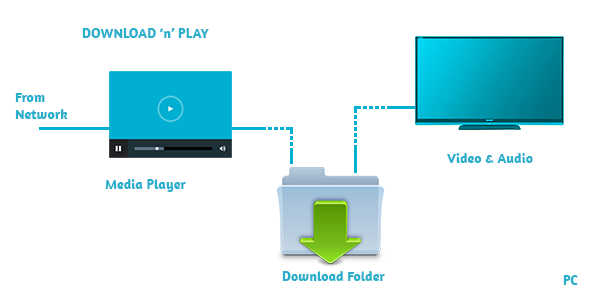
Copying content to your local machine is termed as Downloading. While we perform file download, the entire file is saved on the machine. By doing so, we have quicker access to the different parts of the file. While downloading leave us with a big disadvantage ie in order to access the file we need to wait for the whole file to download first and then can be used. The file is not accessible in between downloading process.
How to access?
-
Use a hyperlink to the file
-
Embed the file in a web page using special HTML code
These type of delivery is stated as HTTP delivery or HTTP streaming. Without any additional software or any hosting plans, it is easy to setup and use on any website.
Streaming:
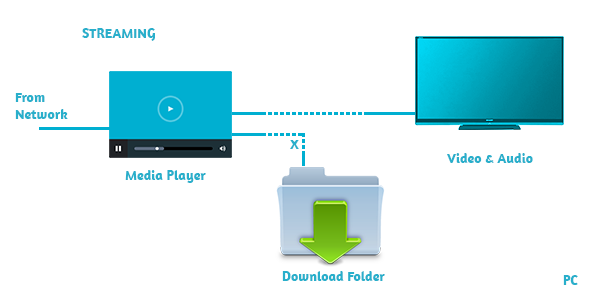
Streaming is a method by which user can watch video immediately after a click on the video. It continues to play till end, more or less smoothly. Unlike downloading, streaming allows to view the content of the file as soon as it begins downloading. Basically, in streaming, a constant stream is sent to the user and user can watch it as soon as it arrives. So, the user doesn’t need to wait for the complete file to download first.
Via Streaming, you get privilege of broadcasting live events like webcast or netcast. Just that we need a streaming server to host all Audio/Video content. To avoid frequent video stoppage, the data rate of the encoded file must be smaller than the remote viewer’s bandwidth capacity. Locally, streaming is not cached like in Progressive Download so streaming is more secure.
Streaming make use of -
-
Encode at CBR - Constant Bit Rate
-
The data rate should be less than the viewer’s bandwidth
-
Determine if there are any streaming server specific requirements for these files
Progressive downloading:
Via progressive downloading, video clip is downloaded but it begins playing as soon as a portion of the file is received. Progressive downloading is the transfer of the media file from the server to a client. Once initiated from a computer, it uses HTTP protocol. The requested video from the server is stored to the viewer’s device - hard drive and then played from the hard drive. So this adds an advantage of smooth streaming, as locally a copy is stored to the disk by a little wait.
If you think time really matters, post a low-resolution version for quick viewing and a high-resolution version for optimal quality viewing.
Progressive download make use of:
-
VBR - Variable Bit Rate Techniques as it delivers the optimum blend of quality file and size.
-
Encode at an optimum data rate in order to maintain good quality in less delivery time.
-
Like streaming, progressive download uses specific requirements for some technologies.
It’s all streaming! General Question - how one will be aware that whether the content (video delivered) is via Progressive download or Streaming? It’s tough to know it by looking at the player or may be can judge from the navigation ( fast, forward) buttons. We can distinguish by checking how the media data file is received and stored by the user’s device. In-depth, the streaming method make use of streaming server while Progressive make use of standard web server to transfer the file.


Cookies are important to the proper functioning of a site. To improve your experience, we use cookies to remember log-in details and provide secure log-in, collect statistics to optimize site functionality, and deliver content tailored to your interests. Click Agree and Proceed to accept cookies and go directly to the site or click on View Cookie Settings to see detailed descriptions of the types of cookies and choose whether to accept certain cookies while on the site.















About Author
Oodles Admin
Divya has more than 6 years of industrial experience in different domains – SAP EP, Search Quality Operations and Content Writing. She loves travelling across the world and also enjoys watching movies.