How to test Responsiveness on the application
Posted By : Nargis Khan | 06-Jun-2017
Meaning of Responsiveness
A Web design which is a response to a user Interface and Interacts with users easily. The application who is responses as much friendly with the users that quality of the application is called Responsiveness.
Responsiveness of an Application is used in the mobile view. When We Test the Application in the mobile devices then we all think about "Why we make the responsive application?".
Nowadays every company, Organization, and business depend on the website. As we all know these web applications does not need to install the devices because it's not a mobile application. If the user uses the application on the web then is set to the mobile view so the user can easily connect with our application.
The functionality and the UI are the response as the Mobile application but it's not a mobile application. So it's a tester responsibility that checks the responsiveness of the web application.
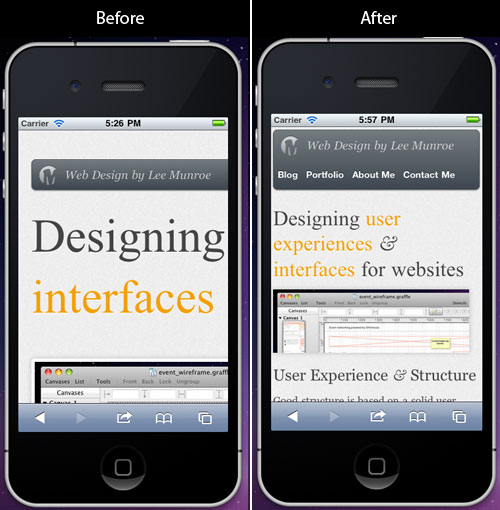
Objective Of Responsive Testing
Here is the point which you can apply and test the application for responsiveness:
1. Test the UI of the application is not breaks in the mobile view.
2. Test all screen view as the web application.
3. Test the functionality of the application in the mobile devices.
4. Test the performance is working same as desktop or not.
5. If you think that this screen is not looking as you want so do not sit ideal, ask Project Manager or Client or where you got the requirement confirm with them. As a tester Never asks the developer.
6. Test the pagination.
7. Test the fields and button. It's looking fine or not.
8. Test content of the application in the mobile view is stable.
9. The tester will more aggressive about to know the requirement of the application.
When I tested the Mobile Devices for the Responsive Application so I faced some Issue:
-
Web site tested for all the screens one by one with UI bases Because all the screen should be looking fine in the mobile devices also.
-
Check with Most usually device like Android and iPhone devices.
-
The small screen are having scroll bar. This should not happen.
Conclusion: Responsiveness of any application is very important for end users. It's a tester responsibility that he/she can give the effective and user-friendly application. He/she will test for all the expect of the web application.


Cookies are important to the proper functioning of a site. To improve your experience, we use cookies to remember log-in details and provide secure log-in, collect statistics to optimize site functionality, and deliver content tailored to your interests. Click Agree and Proceed to accept cookies and go directly to the site or click on View Cookie Settings to see detailed descriptions of the types of cookies and choose whether to accept certain cookies while on the site.















About Author
Nargis Khan
Nargis is certified in Manual Testing , she has done B.Tech in computer science. Her Hobbies are reading books & listening music.