Debugging TiVo application using Opera Dragonfly
Posted By : Rahul Sarkar | 12-Jan-2017
Here I am going to describe you that how we can debugging our TiVo application using Opera Dragonfly.
Opera dragonfly can be used to debug HTML applications as they run on a TiVo STB.
Dragonfly is run in an opera browser on a computer on the same network as the STB.
Console.log and console.info output is obtained from an HTML application running on a TiVo STB by using dragonfly.
Follow the below steps to use Dragonfly for debugging the TiVo App:
Step 1 : Connect the STB using its RJ45 Ethernet connector to the same network as the computer to be used for debugging.
Step 2 : Now check the TiVo STB network setup, on your TiVo box perform the following checks:
From the Home Screen Menu, go to Help & Settings > Settings > Network, You should see a screen entitled "Network Connection".
In this screen you should see the details of Ethernet connection along with the IP address, Now check the IP Address is in the same range you expect and is the same format as the network the computer being used for debugging.
If the Ethernet ip is not on the correct network, select the "Change Network Settings" from the list, this will take you to the "IP Address" Screen, then select "Get Automatically from a DHCP server". The STB should now get the correct ip.
Step 3 : Now open the Opera Browser and invoke dragonfly with: ctrl+shift+i, and click on remote debugging, you will see the below window:
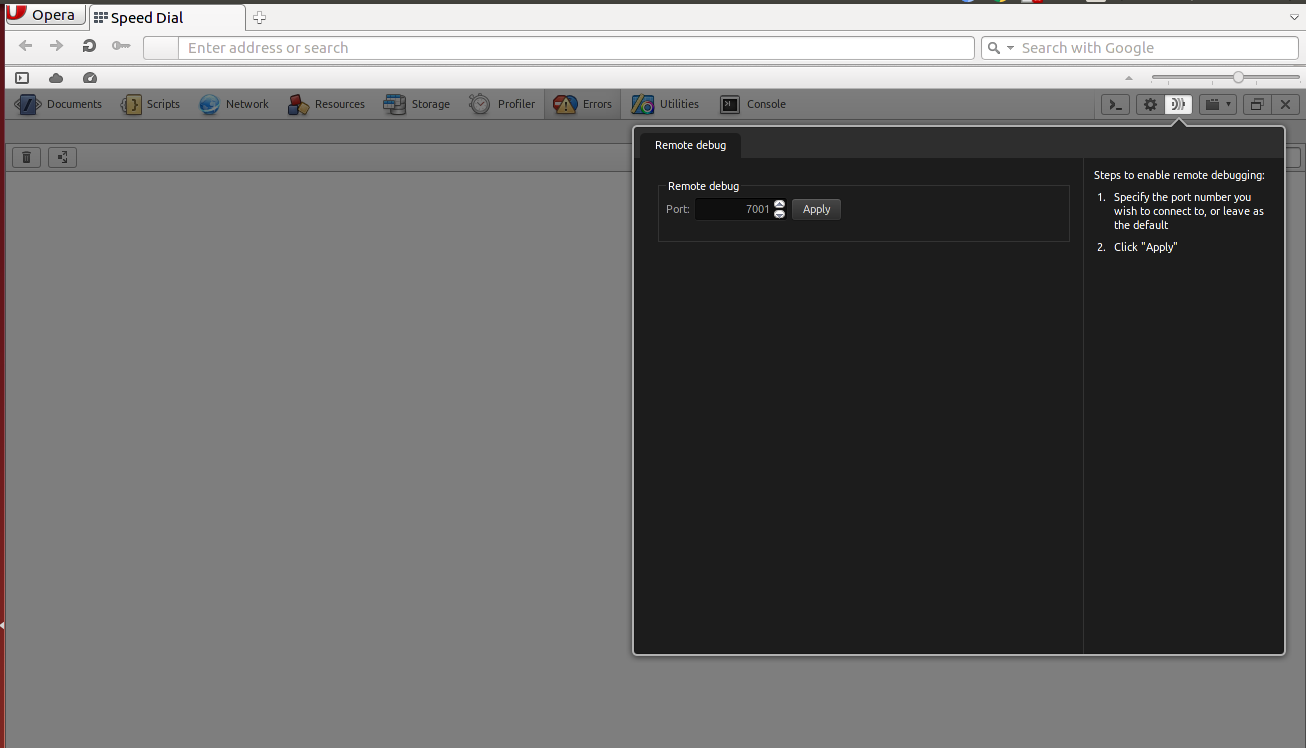
Click on Apply.
Now open your Application on the STB, STB will autmatically detect the dragonfly window.
After Launch the app you will see the logs in your console.
Thanks,


Cookies are important to the proper functioning of a site. To improve your experience, we use cookies to remember log-in details and provide secure log-in, collect statistics to optimize site functionality, and deliver content tailored to your interests. Click Agree and Proceed to accept cookies and go directly to the site or click on View Cookie Settings to see detailed descriptions of the types of cookies and choose whether to accept certain cookies while on the site.















About Author
Rahul Sarkar
Rahul is an intellectual web app developer, he has good knowledge of C, Java, Java Script, Jquery. Apart from this he likes to travel and explore new places.