Create login form in Java using Swing
Posted By : Sudhir Kumar Ojha | 01-Sep-2017
We know that login form is one of the core functionality of any application.Through login form we can authenticate the user of the application.Here is the following code through we can design a Login form in Swing Application.
To create a Login Form, we need use two class files:
1) Welcome.java
2) LoginForm.java
LoginForm.java
package com.sudhir.oodlesTech;

import java.awt.Color;
import java.awt.Font;
import java.awt.event;
import javax.swing.JButton;
import javax.swing.JFrame;
import javax.swing.JLabel;
import javax.swing.JPasswordField;
import javax.swing.JTextField;

public class LoginForm extends JFrame implements ActionListener{
 JLabel l1, l2, l3;
 JTextField tf1;
 JButton btn1;
 JPasswordField p1;
 LoginForm() {
  JFrame frame = new JFrame("Login Form");
  l1 = new JLabel("Login Form");
  l1.setForeground(Color.blue);
  l1.setFont(new Font("Serif", Font.BOLD, 20));

  l2 = new JLabel("Username");
  l3 = new JLabel("Password");
  tf1 = new JTextField();
  p1 = new JPasswordField();
  btn1 = new JButton("Login");

  l1.setBounds(100, 30, 400, 30);
  l2.setBounds(80, 70, 200, 30);
  l3.setBounds(80, 110, 200, 30);
  tf1.setBounds(300, 70, 200, 30);
  p1.setBounds(300, 110, 200, 30);
  btn1.setBounds(150, 160, 100, 30);

  frame.add(l1);
  frame.add(l2);
  frame.add(tf1);
  frame.add(l3);
  frame.add(p1);
  frame.add(btn1);

  frame.setSize(400, 400);
  frame.setLayout(null);
  frame.setVisible(true);
 }
 public void actionPerformed(ActionEvent ae)
 {
   String uname = t1.getText();
   String pass = p1.getText();
   if(uname.equals("sudhir@oodlesTech") && pass.equals("abc@123"))
   {
      Welcome wel = new Welcome();
      wel.setVisible(true);
      JLabel label = new JLabel("Welcome:"+uname);
      wel.getContentPane().add(label);
    }
    else
    {
      JOptionPane.showMessageDialog(this,"Incorrect login or password",
      "Error",JOptionPane.ERROR_MESSAGE);
    }
  }
 }
 public static void main(String[] args) {
  new LoginForm();
 }
}
Welcome.java
package com.sudhir.oodlesTech;
import javax.swing.*;
import java.awt.*;
class Welcome extends JFrame
{
  Welcome()
  {
    setDefaultCloseOperation(javax.swing.WindowConstants.DISPOSE_ON_CLOSE);
    setTitle("Welcome");
     setSize(400, 200);
  }
 }
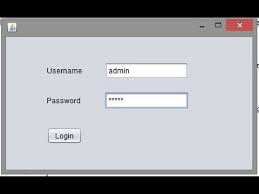
In the LoginForm.java, we have create a text fields t1 and one password field p1 to set the text for username and password. A button is created to perform an action. The method t1 text field get the text of username and the p1 field get the text of password which the user enters. Then we have to create a login button
Output:
Thanks & Regards
Sudhir Kumar Ojha


Cookies are important to the proper functioning of a site. To improve your experience, we use cookies to remember log-in details and provide secure log-in, collect statistics to optimize site functionality, and deliver content tailored to your interests. Click Agree and Proceed to accept cookies and go directly to the site or click on View Cookie Settings to see detailed descriptions of the types of cookies and choose whether to accept certain cookies while on the site.















About Author
Sudhir Kumar Ojha
Sudhir Kumar Ojha is having skills to work as Software developer & having good knowledge of Java.